
How to Bulk Download 50+ OnlyFans Videos
This guide covers large video batches — specifically when you want to download more than 50 videos in one task. For the overall bulk workflow, start with the Bulk OnlyFans Downloader guide. If your task stalls or needs resume, see large download jobs.
What is the problem with downloading 50+ videos?
By default, HotFansDownload can package downloaded files into a single ZIP. When you attempt more than 50 videos at once, the browser may run out of memory and the task can fail.
The recommended setting
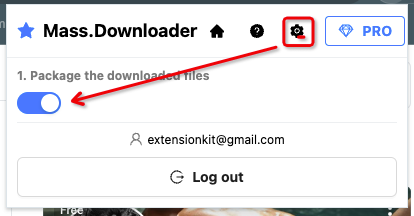
Turn off Package the downloaded files so the extension downloads files one by one instead of bundling them into one archive.
Even with this setting, downloading hundreds of videos in a single session can still be demanding. HotFansDownload also supports on-demand downloading and resuming incomplete files — see the large download jobs guide for details.
How to use it
The toggle is in Settings under Package the downloaded files.
Suggestion
If you are only downloading photos or a small number of videos, you can leave Package the downloaded files turned on.
Important notes
- To support automatic downloads, turn off the following settings in Chrome.

- Each file may open after download (for example, a video in your default player). Avoid running large jobs on shared or public computers.
Some protected or encrypted videos may not be available for download. HotFansDownload only supports content accessible through normal browser playback.
Install HotFansDownload
HotFansDownload Chrome Extension (v1.0.0 ZIP)
🔒 100% Client-Side Executed • Zero Password/Cookie Harvesting • Free Trial (2 Videos)