
Large OnlyFans Download Jobs
This guide covers stability and task management for long-running download jobs — freezing progress bars, resume, pause, and network-related failures. For the overall bulk workflow, see the Bulk OnlyFans Downloader guide. For the 50+ video memory setting, see how to bulk download 50+ videos.
What is the problem with large download jobs?
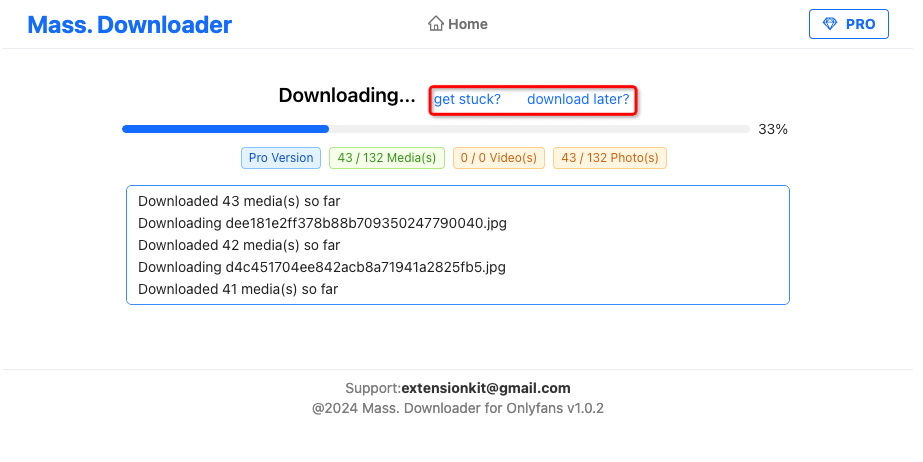
When downloading a large number of media files, the progress bar may freeze at a certain percentage. This usually means one file in the queue failed and the task stopped.
Why downloads fail mid-job
Common causes include unstable network connections, the computer entering sleep mode, or temporary OnlyFans site issues.
On OnlyFans, each media file uses a session token tied to your current IP address. Tokens can change during a long job, especially on mobile networks where the IP may shift. When a token becomes invalid, the next file in the queue may fail.
Resume and pause
HotFansDownload includes a resumable download feature. When a job gets stuck, you can resume from where it left off without re-downloading files already saved.
How to use it
If the progress bar stops updating for a long time on the download page, click Get Stuck to return to the home screen.
On the home page, click Resume Download to rebuild the queue and continue from the last completed file.
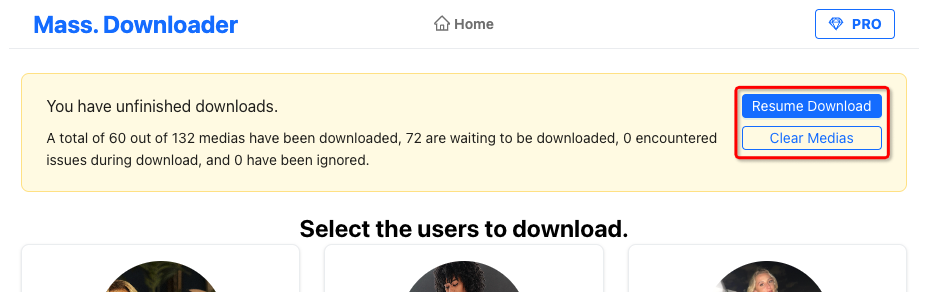
You can also use this to pause a job — for example, if you need to shut down your computer and continue later.
Install HotFansDownload
HotFansDownload Chrome Extension (v1.0.0 ZIP)
🔒 100% Client-Side Executed • Zero Password/Cookie Harvesting • Free Trial (2 Videos)